How do you test a browser game without a test team?
In three layers one person can keep up: automatic checks on every change, a written play route before each release, and real phones before launch.
You test it in three layers, each run as often as it is cheap. Automatic checks run on every change and guard the rules: scores, levels, saves. A written play route is played the same way before every release, on a computer and in a phone-size window. A real phone or two, borrowed if need be, comes before you call the game finished, because a window on your computer is only an imitation of a phone. Strangers come last, for what you cannot see because you know the game too well.
What can one person actually test?
More than it seems, if each kind of check runs at the right moment. A check you have to remember to do is soon a check you skip, so tie each one to an event.
| Layer | What it catches | What it costs | When |
|---|---|---|---|
| Automatic checks | Broken rules, scores, levels that can no longer be finished, saves that no longer load | Seconds of computer time | After every change |
| The play route | Screens that do not open, buttons that do nothing, text that does not fit | Minutes of your time | Before every release |
| Phone-size window | Layout at small sizes, touch buttons, slow loading | Minutes of your time | Before every release |
| Real phones | The on-screen keyboard, real fingers, Safari, real speed | A borrowed phone | Before launch and after big changes |
| Other people | Confusion you cannot see, because you know the way | Someone else's time | Before launch |
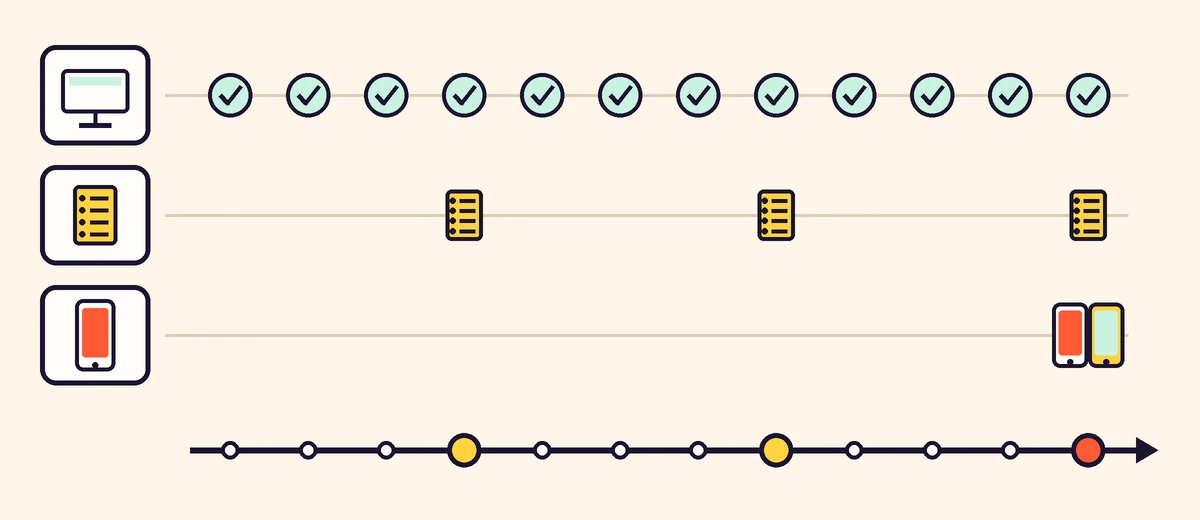
When a game built with an AI assistant breaks as it grows, the first layer is usually the one missing: every change is played by hand, until there is too much to play.
Which checks can the computer run for you?
Anything that has one right answer. Start with the rules your game has already broken once.
- Rules and numbers: restart sets the score to zero; a bonus doubles the points; a level ends when the last target falls.
- Saves: a save made by the last released version still loads in the new one.
- Whole games played by code: a simple player that tries every move and keeps the best one, run through each level. HeapPlay's billiards game, Critter Billiards, has a test of this kind: it requires each level to be finished within its par, so a change to the physics that makes a level impossible fails at once. Tycoon Island has tests that play whole games between robot players.
- Every language complete, if the game has more than one: every text present in each, with the same placeholders.
An AI assistant writes such tests well when the task names the rule and says that nothing else may change. Ask for the test before the fix, run it and see it fail, then ask for the fix and see it pass. A test that has never failed may not be testing anything.
What is a play route, and how do you write one?
A short list of steps, played the same way every time, that passes through every screen and every control at least once. It catches what the automatic checks cannot: a button covered by another one, a screen that opens empty, text that runs off the edge.
Play route (example)
1. Open the game in a fresh private window.
2. Read the first screen without pressing anything: is it clear what to do?
3. Start, lose a life on purpose, lose the game.
4. Restart: score 0, lives 3.
5. Finish level 1. Check that the next level opens.
6. Reload the page. Continue: the game is where you left it.
7. Open the settings, switch the sound off, reload: still off.
8. Repeat 3 to 5 with touch only, in a phone-size window.
This is an example; your route follows your game's screens. Keep it in the game's folder next to the code, so that you and the assistant can find it, and add a step whenever a bug reaches a release. A fresh private window matters: it starts with no saved data, the way a new player does.
How far does a phone-size window on your computer get you?
Further than nothing, not as far as a phone. Chrome's device mode, which turns a desktop window into the size and touch input of a phone, is described in its own documentation (read on 10 November 2026) as "a first-order approximation" of a mobile device. The same page offers to slow the processor down four or six times and the network to fast or slow 3G; the slowing is relative to your own computer, so a fast computer still flatters the game.
Use it for layout, for touch buttons and for reading every screen at a narrow width. Do not use it to decide that the game works on phones. It does not show the phone's own keyboard, which covers half the screen when the player types a name; it does not hold the game in your hand, where a thumb hides part of the screen; and it is not Safari, whose engine most browsers on an iPhone use. Touch controls for a keyboard game covers what to check in the buttons themselves.
HeapPlay's coding course for children was checked only in phone-size windows, and its notes say plainly that the real on-screen keyboard has not been tried yet.
How do you test on a real phone?
Open the game on the phone, then let your computer look inside it.
- The game on the phone. Publish a test copy somewhere the phone can reach, or let your development server listen on your home network and open the computer's network address on the phone. Phone and computer must be on the same network.
- Android. Chrome's remote debugging guide asks you to switch on USB debugging in the phone's developer options, connect the phone by cable, and open
chrome://inspectin Chrome on the computer. The phone's tabs appear there, each with its own developer tools. - iPhone and iPad. Apple's page on inspecting iOS and iPadOS (read on 10 November 2026) asks you to switch on Web Inspector under Settings, Apps, Safari, Advanced, then connect the device to a Mac by cable. The page appears in the Develop menu of Safari on the Mac. After the first cable connection you can switch on "Connect via Network".
If you have no iPhone, borrow one before launch and play the route on it. An older Android phone is worth a turn too, because it shows how the game runs without a fast processor.
How do you test two players when you are alone?
With two separate browsers on one computer, then a computer and a phone. Two tabs of the same browser share their saved data, so the game may take them for one player; a private window, a second browser profile or a different browser each count as a separate device.
Then make the two devices agree. Play a few turns and compare what each one shows: the score, whose turn it is, who owns what. For Tycoon Island, a trading board game played on two phones, HeapPlay's checks compared the money and the owners on both devices after each turn, 128 times in its first check, with no difference. Also test the bad cases on purpose: close one device's page and open it again, switch off the network for a moment, leave one device idle.
Test the game where players will see it, too. Tycoon Island's check inside the HeapPlay page, where the game runs in a frame of about 1140 by 640 on a computer, found a "Play!" button covering the room code's digits. It happened there and at no other size.
What will your own checks still miss?
What you do not think of, because you built the game. Tycoon Island 0.1.0 shipped with a "How to play" sheet that opened hidden under the title screen; its checks never opened that sheet from there, and it was found and fixed in the next version. As of 9 November 2026, Tycoon Island's notes record no check on a physical phone or tablet and none in Safari.
The fix for both is the same: add the missed step to the route, and say honestly on the game's page what has and has not been tested.
When do you need other people?
Once the route passes. Ask someone who has never seen the game to play it while you watch without helping, and ask them to say aloud what they think each screen wants. Where they stop, the game needs a change, not an explanation. Write down where they stopped, not only what they said afterwards.
Then a wider group: friends of friends, a forum for your genre, or a games catalogue. On HeapPlay you can submit a game once it plays through without your help.
Common questions
Do I need a test framework? Not to start. A page that calls your game's functions and shows each result in green or red is enough, as long as you open it after every change.
Should the AI assistant play the game for me? It can run the tests and, with a browser automation tool, follow a written route and take screenshots. Look at the screenshots yourself; a check that the assistant both writes and judges needs your eyes once.
How many phones do I need? As many as your players use, which you will not know yet. One Android phone and one iPhone, borrowed if necessary, cover the two browser engines most phones run.
How do I know a test still tests anything? Break the rule it guards, on purpose, in a throwaway copy, and see the test fail. Then undo the break.
Building a game? Submit it to HeapPlay and see what developers get.