What does a game page need before a stranger presses "play"?
A picture of real play, one plain sentence about what you do, a play button that works on the visitor's device, and honest facts about cost and controls.
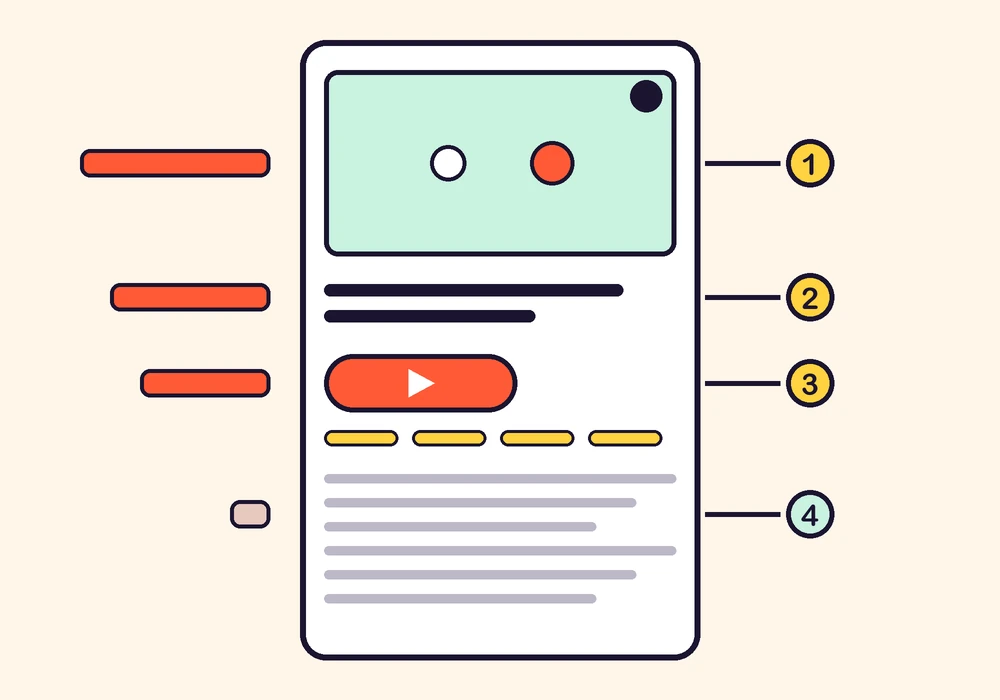
A stranger decides from four things, usually in this order: a picture that shows the game being played, one plain sentence that says what you do in it, a play button that works on the device they are holding, and a few facts that remove the reasons to say no (cost, registration, installation, controls). Everything else on the page is read only by people who have already decided to stay. Put those four at the top, keep them true, and let the longer description come after.
What does a stranger decide in the first seconds?
Whether the game is the kind of thing they want, and whether trying it will cost them anything. They have not read your description yet, and most will not.
Developers who ask on itch.io's forums why visitors open their page but do not play get much the same answers from other developers: a clearer cover, a shorter first line, screenshots of the actual game, accurate tags, and a version that runs in the browser. These are opinions from a forum, not measurements, but they agree with what the large stores ask of developers, below.
What should the picture show?
The game itself: the screen a player will actually see, at a moment when something is happening. A logo on a plain background tells a stranger nothing about how the game plays.
Valve's rules for Steam's store graphics (in effect since 1 September 2022, read on 24 November 2026) allow game artwork, the game's name and an official subtitle on the main capsule, and nothing else: no review scores, no award names or logos, no "on sale" text, no "wishlist now". You do not have to follow Steam's rules on another site, but the reasoning carries over. A small picture has room for one message, and it should be the game.
Two more points that cost nothing:
- Leave words out of the picture. Steam's description guide advises images without text, because text inside an image has to be redrawn for every language. A picture of play needs no translation.
- Check it at the size it is shown. In a catalogue the cover is often a few centimetres wide on a phone. Shrink it and look: if the action turns into a smudge, crop closer.
What goes in the first sentence?
What the player does, in the player's words, and who it is for if that matters. Not the story's background, not the engine, not how long you worked on it.
Steam calls this the short description and describes it in its guide to the store page written description (no date on the page, read on 24 November 2026): a synopsis of a few hundred characters at the top of the page, in plain text, about what makes the game different and its genre if possible, without time-bound phrases such as "Now Available". Feature lists and story belong lower down.
An example from HeapPlay's catalogue, the first line of Critter Billiards: "Billiards for children aged 3 to 10: pull the white ball back like a slingshot and help funny critters into the pockets. Alone, with a robot or a friend." It says the genre, the age, the one action you repeat, and who you can play with. A useful test: if someone reads only that sentence, could they say what they would do in the first ten seconds?
Where should the play button be, and what should it promise?
At the top, next to the picture, and it should start the game on the device the visitor is using. If the game runs in a browser, that is your strongest argument: one press and they are playing. If it does not run on a phone, say so beside the button rather than letting a phone visitor find out after a long load.
Next to the button, answer the questions that stop people pressing it:
- Is it free, and are there purchases or advertising?
- Does it need an account?
- Does it need installing, or does it play in the page?
- Which controls: keyboard, mouse, touch, a gamepad?
On HeapPlay, a game that plays in the page shows "Free · No registration · No installation · Loads when you press play" under its button, and a phone code that opens the same page on a phone. The loading itself matters as much as the promise: what happens after the press is covered in how to make a browser game load fast on a phone.
Which facts should the page state, and what if you do not know one?
State what you know and have checked, and leave the rest out. A wrong fact costs more than a missing one: a visitor who finds the game will not run on their phone, after the page said it would, does not come back.
| Fact | Why a stranger needs it | What to write if you are not sure |
|---|---|---|
| Devices and browsers | Whether it will run where they are | Only what you have seen working |
| Controls | Whether they can play right now | What the game actually accepts |
| Price, purchases, advertising | Whether it will cost them | Each one separately, or nothing |
| Registration | Whether they must hand over an e-mail | Whether play needs it, and what for |
| Players | Whether they can play alone or need a friend | The modes that exist today |
| Version and changes | Whether the game is alive | The last release you made |
HeapPlay's submission rules ask for the same discipline: tick a platform only if you have seen the game work there, and leave a version empty rather than invent one. Its game pages also show what was checked and what was not, in plain words, for example "Not yet tried on a physical phone or tablet". That sentence does not put players off; it tells them what to expect.
What belongs further down the page?
The longer description, more screenshots or a short clip, the list of changes, and credits. Steam's guide notes that by the time a visitor reaches its "About This Game" section, they have probably seen the screenshots and the trailer already. Its advice for that section: avoid long walls of text, put key features and headings in bold, keep insider jargon to a minimum, and use pictures.
A short list of changes with dates does two jobs at once. It shows that someone looks after the game, and it tells a returning player what is new. Write each entry as what the player will notice, not what changed in the code.
How do you check the page before you share it?
Look at it the way a stranger will, not the way you, who know the game, do:
- Open it on a phone, logged out, in a private window.
- Look at the top for five seconds, then look away and say what the game is and what you would do first.
- Press play and time how long it takes to reach the first moment of real play.
- Compare every fact on the page with the game as it is today.
- Show it to one person who has never seen the game, and ask the same question as in step 2.
If an AI assistant drafts the text, give it the game's own notes as the only source and ask it to mark anything it cannot support. Check every claim it makes about features, devices and prices yourself: an assistant writes a confident sentence about a mode that does not exist as easily as about one that does. How to set such a task is in how to write a task for an AI coding assistant.
Common questions
Do I need a trailer? It helps on a store where the game cannot be tried at once. For a game that plays in the browser, a working play button does the trailer's job better; a short clip of real play is a good second.
How long should the first sentence be? Long enough to say what the player does and for whom, short enough to read without scrolling on a phone. Steam allows a few hundred characters for the whole short description.
Should I quote reviews or ratings at the top? Not on the cover picture. Where a site shows ratings itself, as HeapPlay does with the number of ratings beside the average, let that speak.
My game is not finished. Should it have a page yet? If it can be played from start to a sensible end, yes, and say what is missing. A page for a game that cannot be played yet is not accepted on HeapPlay.
Where do I list a browser game for free? HeapPlay lists playable games with a link to their official source; see the page for developers.
game-page launch browser-games
Building a game? Submit it to HeapPlay and see what developers get.