How do you review an AI assistant's change before keeping it?
Compare the changed files with your task, read the diff from the deletions up, run the checks yourself, play the change, and only then commit it.
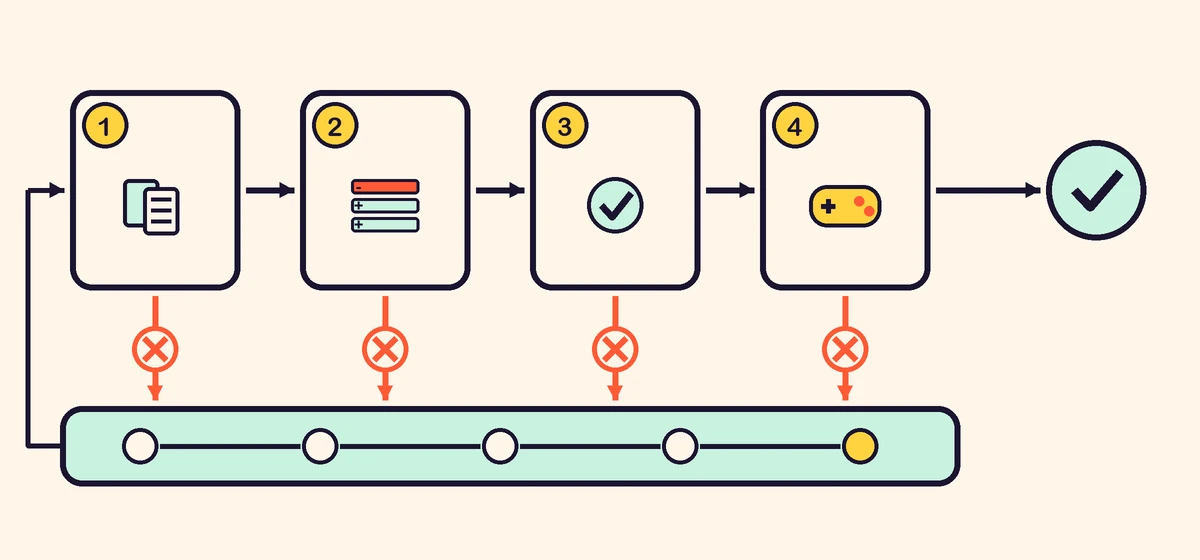
Look at four things, in this order: which files changed, what the diff removed and added, what the checks say when you run them yourself, and how the game plays where the change landed. Keep the change only when all four agree with what you asked for, and keep it as a commit. If any of them does not, undo it and ask again with a better task. The assistant's report tells you where to look; it is not the review.
Why is "done" not enough?
Because it is a claim, and the change itself is the evidence. An assistant can say that a feature works when it only checked that the code builds, or that it touched one file when a command it ran rewrote three.
Some of this is not visible in the editor at all. Visual Studio Code's page on reviewing AI-generated edits says that pending edits are already saved to disk, that changes made through terminal commands or scripts do not appear in its list of edits, and that its checkpoints do not undo terminal commands or deployments. The page read that way on 29 October 2026, last updated 21 October. Whatever tool you use, the reliable view is the one version control gives you: every file that differs from your last commit.
That is why the first step happens before the assistant starts: save a working version as a commit. Without it there is nothing to compare the change with, and nothing to go back to.
What should you look at first?
The list of changed files. Two commands give it:
git status
git diff --stat
git status names every changed file and every new one. git diff --stat adds how many lines each file gained and lost. Note that git diff on its own does not show files that are new and not yet added to Git; git status does, so read both.
Now compare the list with your task. If you wrote a task that says where the change goes and what must not change, this takes seconds.
| What you see | What it may mean | What to do |
|---|---|---|
| A file your task said to leave alone | The change spread further than asked | Read that file's diff first |
| Many more lines than the task needs | Rewritten code, or two changes in one | Ask why, or split the task |
| A new library or a changed package file | A dependency you did not ask for | Ask whether it is needed |
| A changed test file | The test may have been bent to pass | Check that the test still checks the rule |
| A changed save or settings format | Old saves may stop loading | Load a save made before the change |
None of these is wrong by itself. Each one is something you did not plan to review, so it comes first.
How do you read the diff if you are not a programmer?
Read it as a list of removed lines (red, marked -) and added lines (green, marked +), and start with the removed ones. A line that disappears is the easiest change to miss and the hardest to notice in play: a check that stopped a player walking through walls, a reset of the score, a guard against an empty save.
Then look for a few patterns that are easy to spot without knowing the language:
- Numbers that changed: speeds, lives, timers, prices. Each one should be in your task.
- Code turned into comments, or a whole block deleted and written again elsewhere.
- A new function that looks like an old one: the same job done twice, which later drifts apart.
- Text the player sees: menus, hints, error messages. Is it still correct and in the right place?
For any line you cannot read, ask the assistant what it does and what calls it. That question costs nothing, and an answer that does not match the code is itself a finding.
Which checks should you run yourself?
The ones your task named, run by you rather than reported. If the task asked for a test, run the tests and read the result. If it asked that the page load with no errors, open the game with the browser's console open. A check you saw pass is worth more than a sentence saying it passed.
A green test proves only what it tests. If a test file changed in the same diff, read that part: a test that used to expect a score of 0 after a restart and now expects whatever the code returns no longer checks anything.
What should you play before keeping it?
First the change itself, the way your task described it. Then a short route through the rest of the game, the same every time, because a change in one place often breaks another:
- start the game from a fresh page;
- use every control once, on a keyboard and on a phone if the game has touch controls;
- pause, lose, restart;
- save, reload the page, load.
The route takes a few minutes and catches what tests rarely cover: a button that no longer responds, a screen that cannot be left, a save that does not come back. If the change added a key or a screen, check that it works by touch too; that is the rule we keep for KittenGalaxy since we added its touch controls.
How do you keep the change, or throw it away?
To keep it, commit it, with a message that says what changed in the player's words: "each wave 10% faster, up to twice the starting speed". One task, one commit. Later, when something breaks, you can find which change did it and undo exactly that one.
To throw it away, return to your last commit. In Git, git restore . puts the files Git already tracks back as they were at your last commit, unless the changes were staged with git add; files the assistant created are not removed by it, so check git status again and delete them by hand. Editors with their own undo or checkpoints can do the same, within the limits they describe. Then write a better task: say what went wrong, and add a check that would have caught it.
It is tempting to keep a change that is mostly right and fix the rest in the next task. Do that only when you can name what is wrong and it is small. A change you do not understand does not get easier to understand once the next one is built on top of it. This is how games made with assistants grow out of control, and why a small first game is easier to keep working.
Can another AI do the review?
It can read the diff with you: explain lines, point at removed checks, ask what a new function is for. That helps, especially if you do not read code. It cannot decide whether the game still does what you wanted, because only you know that, and it cannot play the game for you. Use it as a second reader, never as the approval.
Common questions
How long should a review take? About as long as the change is small. If reading the diff takes longer than writing the task did, the task was probably too large; split the next one.
Do I need Git for this? You need some way to see what changed and to go back. Git is the usual one and is free; most editors and assistants work with it.
What if the change is right but the code looks messy? Keep it if it works and you understand it, and write a separate task to tidy it, with the same checks. Do not mix tidying into a feature change.
Should I review changes to art, sound and level files? Yes, by looking and playing rather than by reading the diff. The list of changed files still tells you which ones to look at.
When can other people play it? When the route above passes on a fresh page and a stranger can finish the game without your help. Then you can submit it to HeapPlay.
ai-assistants workflow version-control
Building a game? Submit it to HeapPlay and see what developers get.